iPhone VPN's Importance and How to Configure an iPhone's VPN

Posted by Golden Dragon In | 0 comments»

Introduction: 

Your iPhone is not just the phone, it helps you in many different ways such as communication with your friends, and it manages your daily tasks. Many useful and important things can be bought through this phone. For you iPhone, you must have a system that maintain the security and privacy settings and it could also maintain the filter systems of your iPhone. So, here is the solution to this problem which we call it “Virtual Private Network" (VPN).

We shall first understand that what a VPN basically is? The security level of your internet connection increases by VPN. Therefore, the circulation of data becomes absolutely safe and secure.

Importance: 

You can use this feature of VPN in your iPhone also just like in computers. You would be able to use internet on your phone very easily. It doesn't allow the third party to enter into your phone to create some problem in communication and in browsing. This VPN for iPhones also block hackers who try to hack your email and your important personal data. This VPN for iPhone is very essential and has become necessary for the iPhone users. WiFi technology has become popular everywhere, where ever you go, you find WiFi connection which helps you to have internet access any time but most of the people who use this feature are hackers. So, if you are using internet through WiFi without having a VPN, these hackers can easily see what website you are browsing and if you have browsed some important website just like your bank account or where you put some personal data they can easily get an access to those websites.

Just because of these severe attacks by hackers and mismanagement in the security, this VPN feature has introduced in the Iphone. Now your data would be secured and you can have access to internet anywhere at any time. By using this feature in your phone, No one will be able to see what you are browsing, downloading on internet. The efficiency of your iPhone can be increased by implementing VPN. You can do your any work without any kind of risk. 

Steps to Configure VPN on an iPhone: 

VPN's are used in an organization to communicate private information securely. Some steps must be followed to use VPN on iPhone.

  • Go into the settings options> General> Network>VPN and then select "Add VPN configuration" for IOS 7, the VPN menu can be found directly under settings> General.

  • You must ask your network administration that which setting you use, if you don't know. 

  • The option for turning VPN on ‘off appears in the main screen when the VPN configuration has created once you are connected the VPN icon comes in the status bar. 

Tips and Warnings:

If you are using more than one VPN configuration, you could switch between the configuration by moving to settings>General>Network>VPN.
If a same VPN have set upon your computer. Same VPN have set upon your computer same VPN settings can be used for your device.

Author Bio: The article is written by Uzma Parveen who loves to describe the necessity of iPhone VPN service for internet users.

Samsung Galaxy Mega 6.3 – What Makes this Latest Galaxy Addition Mega in the Eyes of Consumers?

Posted by Golden Dragon In | 0 comments»
Ever since the inception of the Samsung Galaxy Note and Galaxy Tab series, it has been made clear that there is definitely an appetite for extremely large screen mobile devices. A great example of this is the Samsung Galaxy S IV, which has a display screen size of 5 inches. Despite the fact that the Galaxy S IV was only rolled out just a few months ago, South Korean company Samsung decided that its already big screen size can further be increased. Now, this month of June, the Samsung Galaxy Mega 6.3 is available for those who are looking for a Galaxy Smartphone featuring a much larger screen size.

Samsung Galaxy Mega 6.3As the name of the Smartphone already suggests, the Galaxy Mega 6.3 sports a display screen size of 6.3 inches. But is this significant increase in size makes the model an invaluable companion for regular consumers?

Is this really something that business owners would need to strengthen their communications platform? To answer these questions, let us take a closer look at the aspects that make this latest Galaxy addition ‘mega’ in the eyes of users.

Tablet and a Phone Rolled into One


Samsung was asked who the Galaxy Mega 6.3 Smartphone was aimed at. According to the South Korean company, the device is perfect for students, as it already serves the purpose of both a Smartphone and a tablet. This means that there is no longer a need for a consumer to buy these two devices separately, as their functions are already rolled into just a single piece of equipment. So what does this translate to? Cost-effectiveness, convenience, and practicality.

Sharp and Clear Display Screen


Another aspect of the Galaxy Mega 6.3 that may just wow its users is the fact that its display screen produces sharp and clear images and text. What makes this impressive? The simple answer is that the Mega 6.3 does not come equipped with Samsung’s very own Super AMOLED display screen technology nor a Full HD capacity. So despite the phone lacking in these two latest display screen technologies, it is a nice surprise that sharpness and clearness will not be a problem.

Other Great Aspects of the Phone


There are several other aspects of the phone that consumers are sure to be happy with. One is that the messaging system of the Samsung Galaxy Mega 6.3 has been improved, making it a lot more accurate than many of the other Galaxy models available, such as the Samsung Galaxy S III. Of course, users can still download and install a new messaging system option, but the one pre-installed is not that bad.

The Galaxy Mega 6.3 is also powered by a 3200 mAh battery. This is great as it means that the massive display screen will be able to run for a complete day (and a few more hours) without charging it in between. Problems with battery life have always been constant in the large screen device industry, but this new Galaxy model may just be out to conquer them all.

Final Thoughts


Of course, there are still a few things that you may find not-so-mega about the Samsung Galaxy Mega 6.3, such as the fact that you will not be able to hold it to your ear comfortably. Holding such a large phone to your ear when making or taking a call will definitely make you feel uncomfortable. Other than that, since the phone offers cost-effectiveness, convenience, and practicality, regular consumers may just be happy with it. It is definitely not a wise idea to make the phone your primary business telecoms platform, but it will be a great addition to a tried and tested system, such as the RingCentral business phone.

Author’s Bio: Chiastine Ross, a freelance article writer and contributor who focus more on technology, mainly Gadgets and all the latest trends which are interesting for readers and tech enthusiasts. Her articles are written in collaboration with other Phone Service Providers such as RingCentral. You can reach her though Facebook and Twitter

The significance of the Antivirus Software and its main features

Posted by Golden Dragon In | 0 comments»
Antivirus software is for the prevention, detection and the removal of the viruses including the different types of the Adware, spyware from the system. Antivirus software development companies always remain involved in making their program powerful to remove even the strongest viruses.

The virus detection techniques


The different antivirus software uses different identification strategy, like most common is the signature based detection process for the detection of the executable malicious software. However, if the malware does not have any signature, the antivirus still can detect and remove such virus by the use of heuristics. This detection method is supremely efficient, this technique makes the penetration into the malicious codes in the files possible.

The significance of the Antivirus Software and its main features
Indeed, it is the most essential software the computer owners and the Internet users must install on their PCs. We should also know the certain consequences and the down backs of such antivirus software. The inefficiently developed software can reduce the performance of your computer.

The most difficult step is to find the best antivirus software. There are many antivirus services which are providing the protection at their best, but you must find the one which suits your needs and most importantly must suits your pocket. There should be compatibility between the antivirus software and the other program running onto your system.

The interesting facts about the software are that they do not only provide protection against the viruses but also scan the complete system during the installation process.

The best antivirus must have following features.


Almost all the antivirus software is providing the trial versions. It is convenient for the users as they can test the efficiency of these software before spending money on them. The trial version enables users to evaluate the best suited software for them.

The antivirus software must have the automated update capacity wherever the user connects the system to the world on the Internet. The emails are the easiest way to break the security of the system;therefore the smartest virus removal software use to scan every incoming and outgoing email.

The idea antivirus software does not only provide protection from the lethal viruses but also provide the shield against the fatal Trojans, Adware, keyloggers and the various kinds of the spyware's. The experts consider a complete antivirus package who has the efficient personal firewalls within it.

A security suite must have the inbuilt spam filter so that the software able to accurately filters spam. It should also have phishing protection tool. With the help of these tools it can scan all the links posted on the wall of social media networks.

Maria is a 20 year old part time writer. She is extremely passionate about bester virenschutz 2013 and loves to write Reviews on everything that interests her.

Income on the Internet: How to Lay a Freelancing Foundation

Posted by Golden Dragon In | 0 comments»
Everyone is making money on the Internet, right? Not really. There are few industries out there as hyped as the "online marketing" niche. Marketers would like you to believe that they have a system for making money online - that all you need to do is buy their system and follow a blueprint. The money will come rolling in, even if you have no previous freelancing experience. The truth is that it takes hard work, dedication, and skill to make money online.

Have a Marketable Skill

The first thing you need is a marketable skill. Without one, you won't make a dime. Whether you're a computer programmer, a writer, a web designer, or a photographer (or some other professional), you need to have something to sell. Even secondary skills can be marketable skills.

For example, if you don't have much experience as a technical writer, but you're good with blog-style posts, there's a market out there for you. Content is a big business on the Internet. Even large companies need blog posts written on a regular basis to attract and keep readers, for PR, and even for other marketing initiatives.

Create a Brand For Yourself

If you want to be a professional freelancer, you need a brand. People must like and trust you because they're buying you. They're not buying a faceless entity. You're a real person - show that to the world.

If you plan on succeeding in the world of freelancing, you'll need to create a really strong brand image to set yourself apart from the crowd. You have to have a value proposition that makes you very different from everyone else in your space - a unique "voice."

"Best customer service" just won't cut it. It has to be very specific. You'll necessarily have to delineate your market and cut out a lot of people. For example, if you work as a graphic designer, you might choose to do branding work for just online companies or you might choose to focus on a specific industry - like ice cream shops, coffee shops, or large retail operations.

You might specialize in female entrepreneurs, one-man corporations, or companies that align with your philosophical or religious beliefs.

Learn How To Write Ad Copy and Sell

Companies, such as DSL.com, suggest that you not only create and host your own freelance website, but that you market yourself to your target market. To do that, you'll need to become a good copywriter. Ad copy is the way you reach out into the marketplace and advertise yourself to your target market.

Sound complicated? It's not, really. The best advertising books were written long ago - "Scientific Advertising," and "The First Hundred Million" are marketing classics. The principles are timeless, even if the marketing mediums have dramatically changed since the time of the first publishing of those books.

The two most important factors in your ad copy will be:

1) Your offer and;

2) Your headline

Without a good headline, you can't get people to read your offer. But without a good offer, your headline is worthless. Everything in-between the headline and the offer should get people excited about your offer.

The classic sales formula AIDA still works - use it. Grab the audience's attention with your headline. Get their interest by outlining a problem they have. Speak their language. Create desire by telling your target market that a solution exists and what that solution is - in principle (but don't offer your specific solution yet). Finally, ask them to take action by offering them your solution to their problem.

Linda Hunt is a freelance writer. She frequently shares her best tips for creating a living online on freelancer blogs.

Developing and Growing yourself with Android SDK

Posted by Golden Dragon In | 0 comments»
Google’s Android has become one of the most widely used operating systems for cellphones and tablets. A majority of smartphone users today use Android. Phone manufacturers are also increasingly incorporating Android in their products. One of the reasons for the popularity of Android is that it has a good app support. A wide range of apps are available for Android devices for a whole range of functionalities, extending the usefulness of an Android device. The Android SDK stands for Android Software Development Kit. It is software with the help of which new apps are developed for Android. Android SDK is one of the most powerful tools for software development for Android. Since Android’s hunger for new apps increases with its popularity, we may as well gauge the functionality that the software may have.

Downloading Android SDK

To download Android SDK is not a difficult thing to do. A search on the internet will provide the necessary links for downloading the software. After downloading the software, the websites themselves offer Android SDK tutorial to induce a new user into the world of software development for Android.

Components

The Android SDK consists of several components. It includes debuggers, libraries, documentations, sample codes, tutorials and of course a handset emulator based on QEMU. Different versions allow for the software to run in a variety of operating systems and platforms such as Windows, Linux, and Mac etc. The wide compatibility range allows for programmers to work in different platforms with ease.

Android SDK Eclipse

Android SDK Eclipse is the officially supported integrated development environment (IDE) for the software. It supports programming mostly through Java, in a wide range of different programming languages such as Ada, C, C++, COBOL, FORTRAN, Haskell, Perl, PHP, Python, R, Ruby, Clojure, Scala, Android, Scheme and Groovy. The Eclipse also allows for programming using plug ins. The programmers can also use simple text editors to work with the programs they are developing.

The Android SDK comes with older versions of the operating systems as well. This is to make sure that the programs developed with the help of the software are useful for older versions of Android that are still in use. After the latest version is downloaded, there are available options for additionally installing other versions of the software to check for compatibility.

Installing Android SDK

Android SDK installation is a quite simple process. The setup, in the form of a wizard, guides the user through a step by step process which enables him to install the software. The installation process is effortless and done in a very user friendly manner.

From the above discussion it is quite evident that the software will prove to be a very useful one in recent times. A lot of users using Android smartphones today need newer and newer apps to suit their specific requirements. Also the community of Android users’ needs a common base for developing software to share among them. This will enable them to work and coordinate in a better manner.

About Author :- The above article is written by Dasrat Rai, He is Owner Of Bestandriodguide. He writes articles related to cell phone, technology, Gadget, Mobile applications, Tips & Tricks etc.

Samsung Galaxy S4 Zooming and Focusing

Posted by Golden Dragon In | 0 comments»
South Korean based company Samsung is on a roll this year. It just released the much awaited for Samsung Galaxy S4 a few months ago and then continued to bring in new models, such as the Galaxy Mega, which is available in two different sizes, one being a 6.3 version, the other being a 5.8 version. However, the new releases from the company do not stop there. A couple of weeks back, the company revealed yet again another Galaxy model, this time, in the form of the Samsung Galaxy S4 Zoom.

As of now, the Galaxy S4 is available in a wide variety of different versions, including the standard S4, the S4 Active, the S4 Mini, the S4 Google Edition, and the newest S4 Zoom. In this review, we will try to assist you readers as to whether the S4 Zoom is a welcome upgrade or if it is just like many of today’s other updates that lack in value.

A Brief Overview on the Galaxy S4 Zoom

With the ever-increasing popularity of Smartphones, it should no longer surprise consumers that this particular industry is quickly becoming overpopulated. Unfortunately, many of the previous models did not carry what most consumers are looking for – great camera functionalities and capabilities. This is where Samsung’s goal with its latest S4 addition comes into play.

The main attraction to the Galaxy S4 Zoom is its 16 megapixel CMOS sensor, a feature that Samsung hopes to wow and impress even the hardest-to-please photography lovers out there. Given that many of today’s Smartphone users tend to use their device’s camera more than any of its other functions (aside from SMS and calling features of course), the South Korean based company expects the S4 Zoom to provide consumers with what they need in the photography department.

Camera Features and Specs of the Galaxy S4 Zoom

As mentioned above, the Samsung Galaxy S4 Zoom comes with a 16 megapixel CMOS sensor. Alongside this is a built in Xenon Flash and an optical image stabilization technology. The camera itself has a significantly larger lens compared to the cameras of most other Smartphones available today, as well as a larger sensor.

The 16 megapixel rear snapper comes equipped with a 24-240 mm lens. The focal lengths available are F3.1 to F6.3. Galaxy S4 Zoom users can enjoy taking continuous shots of up to 4 fps with the phone’s auto focus functionalities. In addition to these, the latest Galaxy S4 version can also record videos with Full HD capabilities, at 1920 by 1080 p. Playback quality is the same. The front camera, on the other hand, has a resolution of 1.9 megapixels. This is lower than many of today’s other Smartphones, as 2 megapixel or higher front snappers are already a commonplace. It is still good for self-shots and video calls though.

Under the Hood Specs and Qualities of the Galaxy S4 Zoom 

When it comes to talk about under the hood specs and qualities, the best way to describe the Galaxy S4 Zoom is that it is just another Samsung Galaxy S Mini with a significantly enhanced camera capability. This new addition to the Galaxy family runs on the Android Jelly Bean operating system (version 4.2). Like the S4 Mini, the phone also supports 2.5G, 3G, and 4G LTE networks. The display screen measures 4.3 inches and also makes use of the super AMOLED technology.

Final Thoughts

The Galaxy S4 Zoom may prove to be a nice piece of device for those who are looking for a great camera and Smartphone combination. However, if you are not a ‘regular’ user and if you need a telecom platform for business purposes, it is highly recommended that you go with a more established and renowned service, such as the likes of the RingCentral phone service.

Author Bio :- Chiastine Ross, a freelance article writer and contributor who focus more on technology, mainly Gadgets and all the latest trends which are interesting for readers and tech enthusiasts. You can reach her through Facebook, Twitter.

Top five areas for SEO Expert to look upon for Website Performance After Penguin Panda Update

Posted by Golden Dragon In | 0 comments»
In the world of Search Engine Optimization, the procedure of SEO has all the time been a complicated business. The experts need to have all sorts of knowledge regarding SEO in order earn success, or in other words, traffic to the website for which he or she is working on. They need to perform research on keywords through using the best ways. Besides, they always have to be ready for any sort of changes those are made by the top search engines like Google or any other.

Website performance after Panda and Penguin Update

The Penguin and Panda Update

Actually all of us in the SEO world have seen that the Search monster Google, in the last year, made two most important changes with the updates of their algorithm names Panda and Penguin. As a result, many of the successful sites have lost their top ranking because of the new rules imposed by the search master Google.

This change is regarding the way Google’s spider use to recognize and rank a site. In the following, we have discussed about the top 5 areas where the SEO experts need to emphasis for the website performance after the Penguin and Panda update.

1.  Well Written Content:

Now, the Google spider has the ability to check if the content of a site is written badly or not; if there is grammatical or spelling mistakes or if the site is full with too many ads. This change has made the SEO specialists to think more on the quality of the content more than before. Now, you cannot just fill bluff keywords on your site rather you need to make high quality content with no grammar or spelling mistake because it means a lot to hold the top ranking in the organic search result.

2.  The Freshness of the Content: 

 Now-a-days, it is a must to add fresh content into your website. It means you need to add new content on your website frequently in order to keep your place in the competition. There are actually 3 important areas regarding the freshness of the content which include the trending topics like the innovation of the new technologies, the prominent events like the Olympic and the most recent time of the addition of a new content.

3.  The Uniqueness of the Content: 

Uniqueness of the content
After the Penguin Panda update, now it needed to give focus on keeping only the unique content on your website. Please remove all the duplicate content you have on your website and start updating the site with new and totally unique content, if you really want to see your site at the top place.

4.  Be Social: 

Now, it is more important to make your site social since it has become a powerful instrument after the Penguin Panda update. The search master Google now checks how your site is interacting with the social media. But, in this case, please never try to use any bot to perform such activities because Google will identify that and you will be penalized for that.

5.  Stay Away From The Technical Faults: 

At the present time, you need to give more focus on the validity of the CSS codes and the Meta tags. You can just fill your site with bluff templates or flash rather give emphasis on providing a standard and definite architecture to your website. This will help the Google crawler to crawl the information and data of your web page.

So if you want a good Ranking then you have to follow the above mentioned points to fight penguin and Panda update otherwise your sites will be penalized.

Authors Bio :- This article is written by Jennifer Desouza. She is passionate about her work of content writing. She is writing on blogging tips, technology, SEO tricks and trends, Panda and penguine update, web design and development. She is awesome graphic designer also.

Google announces RIP Feature for the Dead (Inactive Account Management)

Posted by Golden Dragon In | 1 comments»
Have you ever thought what would happen for the accounts who had already died? If the dead person was a member of a forum, community etc, then probably his or her account would be deleted for inactivity. However, so far we haven't had such a mechanism for emails and other related products. But now, Google has come up with a new feature called, Google Inactive Account Manager.

This new feature allows Google account holders to decide what to do their accounts after their death or a certain time period. For an example the Google account holders can nominate a beneficiary to donate their digital assets. Or else the users can determine when their accounts expire (such as 6 months or 12 months of inactivity.

Inactive Account Management
Once you have set up your account what to do when it's become inactive, it will get disappeared according to your preference. However after a certain period of inactivity, Google will send an email and a text message (If your account is connected to a mobile number) to the user to make sure he or she's dead and not inactive.

According to the Google product manager Andreas Tuerk, he says, "Not many of us like thinking about death — especially our own. But making plans for what happens after you’re gone is really important for the people you leave behind."

I have cited the below from Google, what Inactive Account Management feature does to your account and some frequently asked questions about this.

How do we detect activity?

We look at several signals to understand whether you are still using your Google Account. These include your last sign-ins, your web history, usage of Gmail (e.g., the Gmail app on your phone) and Android check-ins.

What happens when your account gets deleted?

Deleting your Google Account will affect all products associated with that account (e.g., Blogger, AdSense, Gmail), and affect each product differently. You can review the data associated with your account on the Google Dashboard. If you use Gmail with your account, you'll no longer be able to access that email. You'll also be unable to reuse your Gmail username.

Why do I need to provide a phone number for a trusted contact?

We'll use the phone number for the sole purpose of ensuring that only the trusted contact can actually download your data. Verifying the identity using a mobile phone number prevents data access from unauthorized people who might get hold of the email we send to your trusted contact.

What will trusted contacts receive?

Contacts will only receive notification once your account has been inactive for the specified amount of time -- they will not receive any notification during setup. If you chose to only notify your contacts of your inactive account, they'll receive an email with a subject line and content that you wrote during setup. We'll add a footer to that email, explaining that you've instructed Google to send an email on your behalf after you've stopped using your account. This footer might say something like this:
John Doe (john.doe@gmail.com) instructed Google to send you this mail automatically after John stopped using his account.
Sincerely,
The Google Accounts Team

The above FAQ are taken from Google Support Answers. To setup this service you need to go to Google Account Settings Page, then you will see that there's an option for this.

Tricks Finder Social Sharing Widget at the bottom of the post content

Posted by Golden Dragon In | 0 comments»
This time I thought of introducing a great social sharing widget for you to place it under the post content. This is a blogger xml modification which needs to be added to your template. I have seen many of the bloggers have added the default addthis and sharethis widgets to share the content. But as far as I can see, most of them are not looking great if your blog's colours are not matching or if it's extremely dark.

Earlier I explained how to add a nicely aligned addthis sharing widget to your blog post footer. This was done by modifying the original addthis code. For this new widget I'm introducing I used the same concept, but only added the addthis share button to share with other networks.

Tricks Finder Social Sharing Widget
Sometimes when you add the different sharing buttons from different networks, you will find it difficult to align the buttons horizontally as well as vertically. But I hardly see something nicely aligned buttons used in blogger platform apart from wordpress.

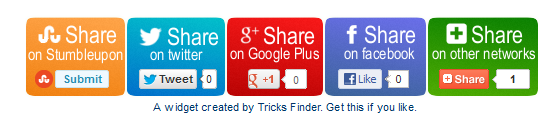
In this widget, I have initially added the networks of stumbleupon, twitter, google plus, facebook and addthis share buttons on the widget. Once added it successfully, it will be visible as follows. But you have to note that this widget will be successfully placed, only if your post content's width is more than 520 pixels.

Tricks Finder Social Sharing Widget

If the above condition is okay, you can add this widget on your blog.

Step 1 : Go to Edit HTML from the Panel. Then tick on the Expand the Widget Template.

Step 2 : Now find the below code.

<div class='post-footer-line post-footer-line-1'>

Step 3 : Now paste the below code just after the code <div class='post-footer-line post-footer-line-1'>

<!-- Tricksfinder Sharing Scripts Start -->
<b:if cond='data:post.isFirstPost'>
<!-- Facebook -->
<div id='fb-root'/>
<script>(function(d, s, id) {
var js, fjs = d.getElementsByTagName(s)[0];
if (d.getElementById(id)) {return;}
js = d.createElement(s); js.id = id;
js.src = &quot;http://connect.facebook.net/en_US/all.js#xfbml=1&quot;;
fjs.parentNode.insertBefore(js, fjs);
}(document, &#39;script&#39;, &#39;facebook-jssdk&#39;));
</script>
<!-- Google +1 -->
<script type='text/javascript'>
(function() {
var po = document.createElement(&#39;script&#39;); po.type = &#39;text/javascript&#39;; po.async = true;
po.src = &#39;https://apis.google.com/js/plusone.js&#39;;
var s = document.getElementsByTagName(&#39;script&#39;)[0]; s.parentNode.insertBefore(po, s);
})();
</script>
<!-- Twitter -->
<script>!function(d,s,id){var js,fjs=d.getElementsByTagName(s)[0];if(!d.getElementById(id)){js=d.createElement(s);js.id=id;js.src=&quot;//platform.twitter.com/widgets.js&quot;;fjs.parentNode.insertBefore(js,fjs);}}(document,&quot;script&quot;,&quot;twitter-wjs&quot;);</script>
</b:if>
<!-- Tricksfinder Sharing Script End -->

<!-- Tricksfinder Horizontal social buttons Start -->
<div class='promote_post_bg' style='padding:80px 0 10px;'>
<!-- StumbleUpon -->
<div style='float:left; padding-top:1px; margin-left:10px;  margin-right:30px;'>
<script src='http://www.stumbleupon.com/hostedbadge.php?s=1'/>
</div>
<!-- Twitter -->
<div style='float:left;'>
<a class='twitter-share-button' data-count='horizontal' data-lang='en' data-related='' data-via='' expr:data-text='data:post.title' expr:data-url='data:post.url' href='https://twitter.com/share'>Tweet</a>
</div>
<!-- Google +1 -->
<div style='float:left;'>
<g:plusone annotation='bubble' expr:href='data:post.url' size='medium'/>
</div>
<!-- Facebook Like -->
<div style='float:left;'>
<fb:like colorscheme='light' expr:href='data:post.url' font='' layout='button_count' send='false' show_faces='false'/>
</div>
<!-- Addthis Start -->
<div style='float:left; padding-left:30px'>
<a class='addthis_counter addthis_pill_style' margin-left='30px'/>
<script src='http://s7.addthis.com/js/250/addthis_widget.js#pubid=xa-4f70472777fa5939' type='text/javascript'/>
</div>
<!-- Addthis End -->
<div class='promote_buttons'>
<center>A widget created by <a href='http://www.tricksfinder.com/2012/12/tricksfinder-social-sharing-widget.html' target='blank'>Tricks Finder</a>. <a href='http://www.tricksfinder.com/2012/12/tricksfinder-social-sharing-widget.html' target='blank'>Get this</a> if you like.</center>
</div>
</div>
<div style='clear: both;'/>
<style>
.promote_post_bg {
    height: 73px;
    background: url(https://blogger.googleusercontent.com/img/b/R29vZ2xl/AVvXsEjw-n36OKMbvhnNdXaLhmAM2SGURK9xwZ5mN2ET2tuMb0L8AZ2HptjYBQV7hQVg_-uEe8D5uWszzGEzTwq95TeYSCBFnMXLicSI5ZIobRdXoT41XS-pXz-V4_5bZssMIc0Mb1VUw0r7Hm6m/s1600/tricksfindersharing+widget+img.png) 0 -7px no-repeat;
    width: 520px;
    margin:0 auto;
}
.promote_buttons {
    padding: 30px 0 10px;
    align:right;
}
</style>
<!-- Tricksfinder Horizontal social buttons End -->

Step 4 : Save the template. That's all you have to do. Now you will have a nice social sharing widget at the bottom of your blog.

FM Radio Recorder app for your Android Phone

Posted by Golden Dragon In | 2 comments»
I have seen many people download apps from Google Play just for fun. Some of the apps in Google Play doesn't really make any sense. They just develop apps and release it to the market without even testing for compatibility.

Recently I needed to download an app to record some music from the FM Radio and I searched throughout the Google Play. I downloaded around 10 apps and none of them worked really. Most of them were designed to record streaming media (internet radio), which was not the one I wanted in my case. Finally I could find a solution for this.

FM Radio Recorder app for android phones
This app is RecForge Lite which is a dictaphone app that records high quality wav, mp3 or ogg files. The app is originally designed to record high quality sounds. This can originally be used to record meetings, music etc. I tested this with my FM player in my Sony Ericsson Live with Walkman and it worked.

Basically the Lite version offers you 3 minutes of recording time from the .mp3 and .ogg formats and then pauses. So you will be having trouble with continues recording of the tracks from Radio. But there will not be any disturbance for you if you record the FM sound tracks with .wav format.

If you still need to go with continuous recording with mp3 or ogg, you can buy there pro version at an expense of $3.85.

Lets see the steps on how you can record the FM Radio sounds using this app.

First Download the RecForge Lite - Audio Recorder from the Google Play.

https://play.google.com/store/apps/details?id=dje073.android.audiorecorderlite

Then connect the headphones, open your FM Radio player, set the frequency (radio station/channel) you want the app to record and let it run on the background.

Open the RecForge app and start recording. Once the app is started recording the track, set its settings to +2 db or +3 db in order to have a louder sound. Otherwise the recorded sound track would not give a loud output.

When you finish recording, it will automatically saved in your default folder where sounds files are stored.

This trick will help you to record sounds directly from FM Radio, rather than going for streaming internet radio recorder apps.